

Best overall for vehicle documentation: Moterno. Best for reported service history: CARFAX Car Care. Best for a custom maintenance log: Google Sheets. This 2026 car maintenance app guide compares seven options by the records you need to keep, not by a single feature checklist.
- Moterno is the best car maintenance app choice here for owners organizing service history, documents, photos, and vehicle stories.
- Choose CARFAX Car Care for reported service records; keep your own invoices alongside them.
- Choose Fuelly for fuel tracking, Drivvo for running expenses, or AUTOsist for receipt-backed maintenance records.
- Simply Auto suits combined fuel and maintenance logging; Google Sheets suits a maintenance log you design yourself.
Why this matters
A maintenance reminder tells you when to act. A service history tells you what happened. Those are different jobs, and your choice should reflect which problem you need to solve in 2026.
Moterno is the best fit here for car owners who want service history, documents, photos, and stories together. If you mainly want to understand fuel consumption or operating expenses, choose an option built around those records instead.
What makes the best car maintenance app?
Judge a car maintenance app against the work you actually need it to do:
- Service detail: Record the date, odometer reading, and work performed. Those 3 fields make an entry useful later.
- Supporting evidence: Keep invoices and documents that explain the work, rather than relying on a brief note.
- Ownership context: Photos and vehicle stories matter when maintenance is part of a longer ownership record.
- Running expenses: Fuel entries and expense categories serve a different purpose from repair documentation.
- Record control: Check how you can retrieve and retain your information before making an app your only archive.
In 2026, start with your existing paperwork. The best choice is the one that gives those records a clear home and supports the habit you will maintain.
Car maintenance apps at a glance
| Option | Best for | Standout focus | Key limitation |
|---|---|---|---|
| Moterno | Complete ownership documentation | Receipts become documented entries; history follows the vehicle | Web app only, no native mobile app yet |
| CARFAX Car Care | Reported service history | Service records reported to CARFAX | Reported history is not a complete account of every repair |
| Fuelly | Fuel-consumption tracking | Fuel logs and consumption calculations | Fuel trends do not explain a mechanical fault |
| Drivvo | Running-expense tracking | Fuel, maintenance, and vehicle expense records | Expense totals do not establish the quality of work |
| AUTOsist | Receipt-backed service logs | Maintenance records with supporting receipts | Document quality depends on what you capture |
| Simply Auto | Combined fuel and maintenance logging | Fuel, service, and expense tracking | A useful history depends on consistent entries |
| Google Sheets | Custom maintenance records | A spreadsheet structure you control | You must design and maintain the system yourself |
1. Moterno: best car maintenance app for ownership documentation
Moterno is a web-based digital garage for anyone who keeps a vehicle: cars, motorcycles, boats, tractors. Each vehicle gets a timeline of servicing, repairs and parts with part numbers, and every entry can carry the invoice, photos and a written story behind it.
The feature that sets it apart is the receipt. Snap a photo of a workshop invoice and Moterno turns it into a filled-in service entry, marked «Documented». The entry and the original document stay linked, so the proof is one click away when you sell the vehicle or dispute a repair.
Moterno pros:
- Receipts become documented service entries automatically, with the original attached.
- Reminders for inspections, registration, servicing and insurance.
- The full history follows the vehicle to its next owner.
- Club pages, stories and classifieds put the record in a community context, not just a list.
Moterno cons:
- Web app only, no native iOS or Android app yet.
- Fuel and running-cost analysis is simpler than in dedicated expense trackers.
Plans: The free plan includes the full vehicle record and community. Premium adds a larger archive, unlimited active listings and data export.
Best for: Owners and enthusiasts who want a documented ownership history that holds up when the vehicle changes hands.
Verdict: Choose Moterno if documentation is the point. Start with your latest invoice, let it become the first entry, and build backwards from there.
Create your free garage on Moterno
2. CARFAX Car Care: best for reported service history
CARFAX Car Care brings service records reported to CARFAX into a vehicle-maintenance tool. Its service-history focus makes it useful when you want to consult reported records alongside the documents you already hold.
CARFAX Car Care pros:
- Provides access to service information reported to CARFAX.
- Includes maintenance reminders.
- Helps you review a vehicle's reported service timeline.
CARFAX Car Care cons:
- Repairs that were not reported will not become reported records automatically.
- A recorded service entry is not a full assessment of vehicle condition.
Best for: Owners who want reported service history as one part of their maintenance record.
Verdict: Pick CARFAX Car Care for reported records; keep your invoices too. Do not interpret a gap in reported history as proof that no maintenance took place.
3. Fuelly: best for fuel-consumption tracking
Fuelly tracks fuel purchases and calculates consumption from your entries. Choose it when your main question is how much fuel the vehicle uses, rather than how to assemble a detailed ownership archive.
Fuelly pros:
- Centers the workflow on fuel logging.
- Makes consumption trends easier to review.
- Gives fuel records a consistent structure.
Fuelly cons:
- Inconsistent fill-up entries weaken the usefulness of the calculations.
- A consumption change does not identify its cause.
Best for: Drivers who want a clear fuel-use record.
Verdict: Use Fuelly for fuel tracking, not mechanical diagnosis. Compare your own entries consistently before drawing conclusions from a change in consumption. Driving conditions and maintenance questions still require separate context.
4. Drivvo: best for tracking running expenses
Drivvo records fuel, maintenance, and other vehicle expenses. Its strongest fit in this comparison is the owner who wants to understand spending across categories rather than keep only a list of completed services.
Drivvo pros:
- Records fuel and maintenance expenses together.
- Supports a broader view of vehicle running costs.
- Includes maintenance reminders.
Drivvo cons:
- Expense totals cannot tell you whether a repair was done correctly.
- Inconsistent categories make comparisons harder to interpret.
Best for: Owners whose main question is where their vehicle spending goes.
Verdict: Go with Drivvo for expense tracking. Give similar work the same category each time, and retain the invoice that explains what the workshop actually did.
5. AUTOsist: best for receipt-backed maintenance records
AUTOsist focuses on vehicle maintenance records and supporting documents, including receipts. It suits owners who want to connect a service entry to the paperwork behind it rather than rely on memory.
AUTOsist pros:
- Keeps maintenance information in a dedicated record system.
- Supports receipts and other documents.
- Includes service reminders.
AUTOsist cons:
- Blurry or incomplete document captures remain poor evidence.
- A receipt does not, by itself, explain every detail of a repair.
Best for: Owners organizing workshop paperwork into a usable service history.
Verdict: Consider AUTOsist when receipts are the core of your record. Read each uploaded document before filing it; the useful details must remain legible when you need them later.
6. Simply Auto: best for combined fuel and maintenance logging
Simply Auto combines fuel, service, and expense tracking. It fits drivers who want to record recurring vehicle activity through one logging routine rather than maintain separate systems for each category.
Simply Auto pros:
- Combines fuel and maintenance records.
- Tracks vehicle expenses.
- Includes service reminders.
Simply Auto cons:
- Missed entries leave gaps in the record.
- Short expense descriptions need supporting context to explain repairs.
Best for: Drivers who will consistently log fuel purchases, services, and expenses together.
Verdict: Choose Simply Auto for a regular logging habit. For your maintenance record, use specific service descriptions: an oil change and a diagnostic visit should not both become an unexplained service entry.
7. Google Sheets: best for a custom maintenance log
Google Sheets is a spreadsheet application, not a dedicated car maintenance app. It belongs here as the do-it-yourself alternative: you choose the columns, organize the entries, and link supporting documents yourself.
Google Sheets pros:
- Lets you define your own record structure.
- Supports sorting and filtering service entries.
- Allows you to share a spreadsheet with other people.
Google Sheets cons:
- Requires you to build the maintenance workflow.
- Does not supply a vehicle-specific service schedule by default.
Best for: Owners who prefer direct control over a simple maintenance table.
Verdict: Stick with Google Sheets if you want to build the system yourself. Skip this option if maintaining the spreadsheet becomes another task you repeatedly postpone.
How we ranked
This ranking prioritizes service-history usefulness, supporting evidence, and a clear ownership record. Fuel tracking, expense analysis, and customization receive separate use-case slots because they answer different questions.
The order reflects those priorities, not a hands-on performance score. The pros and limitations distinguish record keeping from proof of condition: no app turns incomplete paperwork into a complete mechanical history.
Which car maintenance app should you choose?
Choose Moterno if your goal is a documented ownership history that a future buyer can trust. Choose CARFAX Car Care for reported records, Fuelly for consumption, Drivvo for expenses, AUTOsist for receipts, Simply Auto for combined logging, or Google Sheets for a custom table.
Before moving your entire archive, start with 1 vehicle and its latest service. Check whether the resulting entry answers what happened, when it happened, and which document supports it.
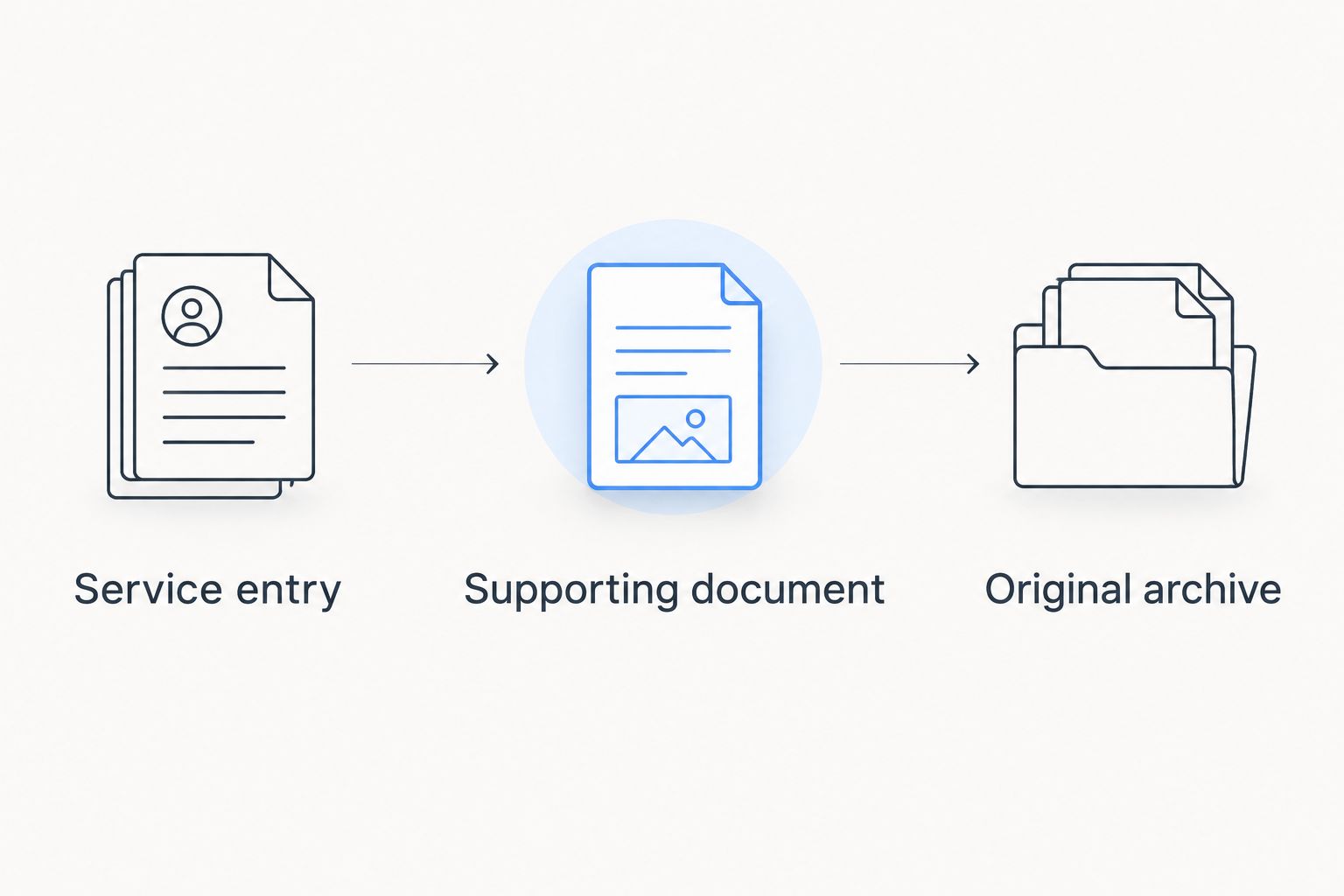
Build a useful record
- Service entry: Record the work, date, and odometer reading.
- Supporting document: Attach or retain the relevant invoice.
- Original archive: Keep the source file outside your primary log.
Keep 2 copies of important documents: one associated with your maintenance record and one in a separate archive. An app should make evidence easier to find, not become its only home.
FAQ
What's the best car maintenance app for keeping service history?
Moterno is the best fit in this comparison. It turns receipts into documented service entries, keeps the original invoice attached, sends reminders, and lets the whole history follow the vehicle to its next owner. Choose a narrower tool if fuel consumption or expense tracking is your main task.
Is CARFAX Car Care a complete record of every repair?
No. CARFAX Car Care includes service information reported to CARFAX, so you should retain invoices for work that does not appear in the reported history.
Is Fuelly better than a service-history app?
Fuelly is the better fit when your priority is fuel-consumption tracking. Fuel records and detailed repair documentation serve different purposes.
Can I use Google Sheets as a car maintenance app?
Yes, you can build a maintenance log in Google Sheets. You must create the columns, maintain the entries, and organize supporting documents yourself.
What should I record after a car service?
Record the date, odometer reading, and work performed. Keep the invoice or other supporting document so the entry has evidence behind it.
Does a maintenance app replace a vehicle inspection?
No, a maintenance app organizes records rather than assessing the vehicle's current mechanical condition. Use the history to inform an inspection, not replace it.
How should I start a digital maintenance record in 2026?
Start with your latest service and its supporting invoice. Confirm that the entry is clear and the document is readable before adding older records.
One last thing
Write down what you do not know. If an invoice records a repair but omits a part specification, leave that detail unresolved rather than filling it from memory. A precise gap is more useful than a confident error when you review the history or discuss the vehicle with a buyer.