Best overall for a motorcycle’s documented history: Moterno. Best for a custom maintenance log: Google Sheets. Best for scheduled reminders: Google Calendar. Best for collecting receipts on an Apple device: Apple Notes. This 2026 guide separates keeping service evidence from planning your next job, so you can choose the tool that fits how you care for your bike.
- Moterno is the best car maintenance app for motorcycles when your priority is service history, documents, photos, and stories.
- Google Sheets suits riders who want a custom motorcycle maintenance log with mileage and parts records.
- Google Calendar handles date-based service reminders; it does not replace a documented vehicle history.
- Apple Notes suits receipt collection on Apple devices; keep service details alongside each scan.
Why this matters
Remember when you last changed the oil? Remember which oil you used, or where you put the receipt? Those are different questions, and a reminder alone cannot answer them all.
A motorcycle record needs to explain what happened, not just tell you that something is due. A useful entry connects the service date, odometer reading, work performed, and supporting document. Photos and notes add context when you replace a part, investigate a fault, or prepare to sell.
The best choice in 2026 depends on your main problem. If receipts disappear, start with document storage. If you forget planned tasks, start with reminders. If you want the bike’s maintenance and personal history together, choose a vehicle-focused record.
Use the owner’s manual to decide what maintenance is due. Use your app to remember, record, and find it. None of these tools replaces the correct service schedule or a mechanic’s assessment.
What makes the best motorcycle maintenance app?
Choose around the information you need to retrieve later, rather than the longest feature list.
- Service detail: Can you record the date, odometer reading, work completed, and parts used without turning every entry into a project?
- Supporting evidence: Can you keep receipts, workshop invoices, documents, and relevant photos with understandable descriptions?
- Motorcycle context: Can you distinguish one bike from another and explain modifications, repairs, and ownership experiences?
- Maintenance planning: Do you need dated reminders, a record of completed work, or both? Treat these as separate requirements.
- Retrieval: Can you find the last relevant entry when you are standing beside the bike or speaking to a workshop?
- Record discipline: Will you actually update the tool after a service? A simple, current record beats an elaborate, abandoned one.
Before choosing your 2026 setup, try writing one recent service entry. If you cannot explain what was done and find the evidence again, change the structure before adding years of paperwork.
Motorcycle maintenance tools at a glance
These options serve different jobs. The ranking puts a vehicle-focused history first, followed by tools for riders who need more control over tables, dates, or documents.
| Tool | Best for | Standout purpose | Key limitation |
|---|---|---|---|
| Moterno | A motorcycle’s service history and wider story | Vehicle records with documents, photos, and stories | Owner-entered records still need supporting evidence |
| Google Sheets | A custom DIY maintenance log | Rows and columns you define around your own work | You must create and maintain the structure |
| Google Calendar | Date-based maintenance reminders | Scheduled events for planned tasks | An event is not evidence that maintenance happened |
| Apple Notes | Collecting receipts on Apple devices | Document scanning and written notes | Motorcycle-specific organization is up to you |
You do not have to make one tool do everything. A vehicle record and a calendar can serve different purposes without duplicating every document. Keep completed work in one main record; put future dates in your reminder tool.
1. Moterno: best for a motorcycle’s documented history
Moterno is a digital garage platform for service history, documents, photos, and vehicle stories. Its vehicle-focused approach suits an owner who wants the maintenance record to sit alongside the experiences that make the bike theirs.
Think beyond the oil change. A workshop invoice explains a repair, a photograph shows a replaced component, and a short note explains why you chose it. Keeping those pieces together gives you more context than a list of completed tasks.
This is the first choice here for a rider whose main goal is a documented motorcycle history. The distinction matters: keeping a record and calculating the next required service are not the same job.
Moterno pros:
- Service history is part of a vehicle-focused platform rather than a general-purpose document.
- Documents and photos can support your written maintenance record.
- Stories let you preserve the ownership context alongside mechanical work.
- The community marketplace supports browsing or listing cars, separate from the record-keeping purpose.
Moterno cons:
- A detailed owner-entered history does not independently verify that work was performed correctly.
- You still need to consult the motorcycle’s manual for the applicable service requirements.
- The quality of the history depends on adding clear entries and relevant documents.
Best for: Motorcycle owners who want maintenance evidence and the bike’s wider story in a digital garage.
Start with the latest completed service, not a perfect reconstruction of every previous owner’s work. Mark uncertain information as uncertain and keep dated evidence where you have it. Verdict: Choose for a vehicle-centered history.
2. Google Sheets: best for a custom DIY maintenance log
Google Sheets is a spreadsheet, not a motorcycle-specific maintenance app. You create the columns and record the work in rows, which makes it useful when you want to organize information around your own maintenance habits.
A rider doing their own servicing can separate completed work from measurements and observations. For example, a parts reference belongs in a different column from a symptom you are still investigating. That distinction makes the log easier to read later.
For a 2026 maintenance spreadsheet, start with 3 essential fields: service date, odometer reading, and work completed. Add document references, parts details, and observations only when those fields answer a real question. Avoid making the sheet so wide that recording a simple job becomes a chore.
Google Sheets pros:
- You choose the fields rather than adapting your record to a fixed template.
- Tables make repeated entries easy to compare.
- Sorting and filtering help you find a particular service type or component.
- Separate sheets can distinguish bikes, completed work, and future plans.
Google Sheets cons:
- You must design the structure and keep entries consistent.
- A row does not automatically explain or preserve its supporting receipt.
- Custom formulas need checking before you trust them for maintenance planning.
Best for: DIY riders who prefer structured tables and want control over the details they record.
Keep future work clearly separate from completed work. A row labeled oil change is ambiguous unless its status tells you whether it happened or is merely planned. Verdict: Choose for a custom log; skip elaborate formulas you cannot check.
3. Google Calendar: best for date-based service reminders
Google Calendar schedules events and reminders around dates. It fits riders who already know which task they need to perform and want a prompt to remember it.
Use an event title that names the action, such as review service schedule or book workshop visit. Add context in the event description so you do not have to remember why you created it. Keep the manufacturer’s requirements separate from any date you choose for your own planning.
For a mileage-based task, a recurring calendar event can remind you to check the odometer. It does not establish that the bike has reached its service threshold. You still need the current reading and the correct interval from the manual.
Google Calendar pros:
- Planned maintenance appears alongside your other scheduled commitments.
- Recurring events suit repeated date-based checks.
- Event descriptions give reminders useful context.
- Scheduling a workshop appointment is straightforward calendar work.
Google Calendar cons:
- A reminder date does not track how far you have ridden.
- A past event does not prove a service was completed.
- Calendar entries are not a substitute for organized invoices and service records.
Best for: Riders who need help remembering planned checks and appointments rather than building a detailed vehicle history.
Once the work is done, record the actual date, odometer reading, and evidence in your main log. Do not leave the reminder as the only trace. Verdict: Choose as a planning companion, not your sole maintenance record.
4. Apple Notes: best for collecting receipts on Apple devices
Apple Notes combines written notes with document scanning on supported Apple devices. It suits an owner who wants to capture workshop paperwork and add a plain-language explanation without building a spreadsheet.
Give each service note a meaningful title. A title such as rear tire replacement tells you more than receipt, especially after several visits to the same workshop. Add the service date and odometer reading in the note so the scanned paperwork has motorcycle context.
Use a consistent folder or naming system for each bike. The app provides general-purpose notes; you supply the structure that turns them into a useful maintenance record.
Apple Notes pros:
- Document scanning helps you capture paper receipts.
- Written notes let you explain what the document relates to.
- Photos can sit with your description of a service or repair.
- A simple note can be easier to maintain than a detailed spreadsheet.
Apple Notes cons:
- The workflow depends on using compatible Apple devices.
- Service intervals and mileage tracking need your own organization.
- Inconsistent titles make a growing collection harder to review.
Best for: Apple-device owners whose immediate problem is scattered receipts and short service notes.
Inspect each scan before putting the original away. A missing invoice page or unreadable parts description leaves a gap that a tidy folder cannot fix. Verdict: Choose for document capture; use a vehicle record or spreadsheet when you need a clearer maintenance overview.
How to turn your choice into a useful service record
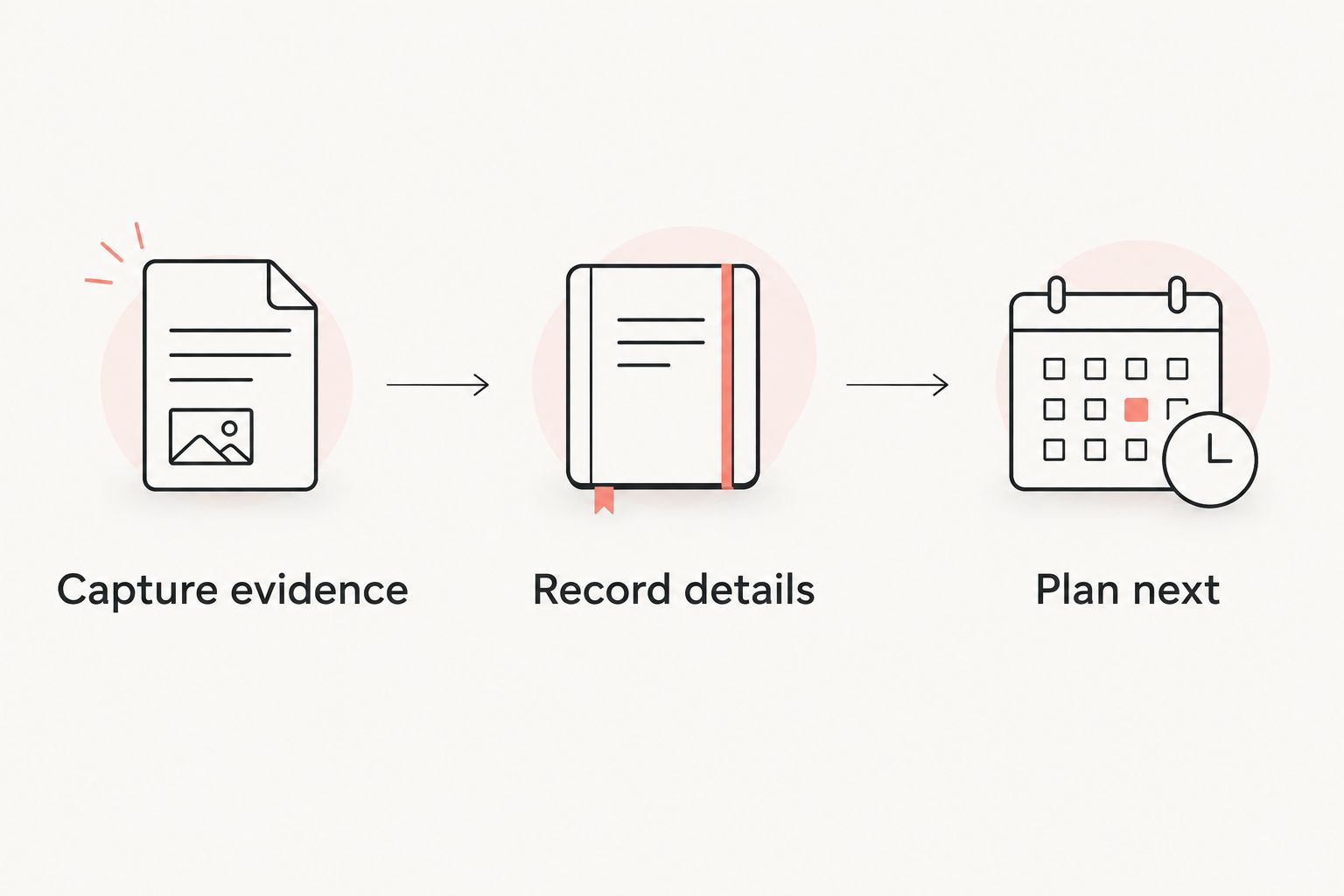
Whichever tool you choose in 2026, use the same small routine after each job. The app matters less if the entry never gets written.
Capture evidence
Save the invoice, receipt, or relevant photo while it is easy to find. Include every page needed to understand the work, not just the payment summary. For your own servicing, preserve the parts information and describe what you actually did.
Record details
Write the service date, odometer reading, and completed work. If the motorcycle was booked in earlier, distinguish 2 dates: the appointment date and the completion date. Use the completion date for the maintenance entry rather than assuming the booking reflects the work.
Plan next
Check the relevant maintenance requirements in the owner’s manual. Put the next planned action in your reminder system, and explain whether it depends on elapsed time, mileage, or inspection. Do not turn a general internet recommendation into the bike’s official interval.
Try this routine on 1 motorcycle before reorganizing every vehicle you own. Once the entry is clear and easy to retrieve, use the same approach for older paperwork. Leave gaps visible rather than filling them with guessed dates or mileage.
How the ranking works
This ranking prioritizes a documented vehicle history, then gives each alternative a distinct job: custom tables, scheduled reminders, or receipt capture. It is a use-case comparison, not a claim that every feature or device combination has been tested.
The criteria are service detail, evidence, motorcycle context, planning, retrieval, and the effort needed to keep the record current. None of the choices gets credit for replacing manufacturer guidance or proving the mechanical condition of a bike.
Which motorcycle maintenance app should you choose?
Moterno is the best fit for motorcycle owners who want service history, documents, photos, and stories together. Choose Google Sheets when your priority is a custom maintenance table, Google Calendar when the missing piece is reminders, and Apple Notes when you need to collect paperwork on an Apple device.
For your 2026 setup, pick one main home for completed work. Add another tool only when it solves a different problem. Keeping the same service history in several places creates extra updating work and leaves you deciding which version is current.
FAQ
What’s the best car maintenance app for motorcycles?
Moterno is the best fit in this comparison for a motorcycle’s service history, documents, photos, and stories. Google Sheets suits custom logs, while Google Calendar suits date-based reminders.
Can I use a car maintenance app for my motorcycle?
Yes, if it lets you record your motorcycle’s service details clearly. Check that your chosen workflow distinguishes the bike, its odometer readings, completed work, and supporting documents.
Is Google Sheets better than a motorcycle maintenance app?
Google Sheets is better suited to riders who want to define their own maintenance table. A vehicle-focused platform is the more direct fit when you want documents, photos, and ownership context alongside service history.
Can Google Calendar track mileage-based motorcycle maintenance?
A calendar reminder does not establish that you have reached a mileage threshold. Use it to prompt an odometer check, then compare the reading with the motorcycle’s specified maintenance requirements.
What should I record after servicing my motorcycle?
Record the service date, odometer reading, and work completed. Add parts information, invoices, receipts, or photos where they help explain and support the entry.
Can a maintenance app replace my motorcycle’s service manual?
No, a maintenance app does not replace the service manual. Use the manufacturer’s guidance for required intervals, procedures, and specifications, and use the app to organize your records.
Should I scan motorcycle service receipts?
Yes, a readable scan helps you keep service paperwork with your digital record. Check that the scan includes the relevant pages and add enough context to identify the bike and work performed.
One last thing
A planned service is not a completed service. Before relying on an old entry, check whether it describes an appointment, a purchased part, or work actually carried out. A receipt for oil shows a purchase; your dated service note explains when that oil went into the bike.
Start with that distinction. It makes even a modest maintenance log more useful the next time you ask yourself, when did I last do that?