Best overall for a vehicle’s documented history: Moterno. Best for organizing document folders: Google Drive. Best simple option for iPhone document capture: Apple Notes. This 2026 guide separates keeping useful copies from keeping the original paperwork that proves ownership.
- Moterno is the best app to store car documents alongside service history, vehicle photos, and stories.
- Google Drive suits owners who want car paperwork organized in folders rather than a vehicle-specific record.
- Dropbox suits document sharing; Microsoft OneDrive suits owners already organizing records with Microsoft tools.
- Apple Notes suits quick document scanning on iPhone, but a title scan does not replace the original title.
Why this matters
Remember when you last changed the oil? The answer might be on a receipt in the glove box, while your registration sits in an email and your title stays somewhere else entirely. A useful document system brings those records together without confusing a saved copy with an official document.
The best choice depends on whether you want a vehicle history or just a place to put files. For your 2026 setup, choose the system you will actually update after a service visit. A tidy folder that stays empty solves nothing.
What makes the best car document app?
- Vehicle context: Can you connect paperwork to the right car and its service history?
- Document capture: Can you save readable copies without turning every receipt into a project?
- Organization: Can you distinguish titles, registration, insurance, and maintenance records?
- Retrieval: Can you find the right document when you need it?
- Sharing control: Can you separate useful buyer information from private paperwork?
- Independent copies: Can you keep essential records outside your everyday system?
Best car document apps at a glance
| App | Best for | Standout feature | Key limitation |
|---|---|---|---|
| Moterno | Keeping documents with a vehicle’s story | Vehicle records include service history, documents, photos, and stories | A stored title copy does not establish legal ownership |
| Google Drive | Organizing paperwork in folders | General-purpose file storage with folders and sharing | You must create the vehicle-specific structure yourself |
| Dropbox | Sharing selected document files | File and folder sharing | A shared folder is not a vehicle history by itself |
| Microsoft OneDrive | Keeping documents beside maintenance spreadsheets | File storage alongside Microsoft document workflows | The owner must connect spreadsheets, receipts, and vehicle details |
| Apple Notes | Capturing paperwork on an iPhone | Built-in document scanning within notes | Notes need deliberate organization to become a useful vehicle record |
No single app wins every job. Document capture, vehicle storytelling, and handing records to another person are different tasks. Use the table to choose your main system, then keep your originals separately.
1. Moterno: best car document app for vehicle history
Moterno lets you log service history, documents, photos, and stories for your vehicles. It also includes a community marketplace where owners can browse or list cars for sale. That makes it a different choice from a folder full of unrelated files: the vehicle is the center of the record.
Moterno is the best car document app for owners who want paperwork connected to their vehicle’s service history and story. Choose it when remembering what happened to the car matters as much as finding the receipt.
Moterno pros:
- Keeps documents in the same platform as service history.
- Includes vehicle photos and stories, not just paperwork.
- Supports a vehicle-centered record for owners and enthusiasts.
- Includes a community marketplace alongside record-keeping.
Moterno cons:
- A digital document copy is not a substitute for the legally required ownership document.
- The record still depends on you adding accurate paperwork and service details.
- Vehicle history requires more context than simply saving an image of a receipt.
Best for: Owners who want to tell the documented story of their car, including the work behind it.
Verdict: Choose this approach when you want a continuing vehicle record, rather than another storage folder.
2. Google Drive: best car document app for folder organization
Google Drive stores files in folders and lets you share files or folders with other people. You can organize scans, PDFs, and photos around each vehicle without adopting a vehicle-specific system. The trade-off is straightforward: you design the structure and keep it consistent.
Start with 1 folder per vehicle, then separate ownership paperwork from maintenance records. Use filenames that describe the document rather than leaving every upload with a camera-generated name. That small habit makes the folder easier to use later.
Google Drive pros:
- Stores different kinds of document files together.
- Lets you create your own folder structure.
- Supports file and folder sharing.
- Works for vehicle paperwork alongside other household records.
Google Drive cons:
- Does not create a vehicle service timeline simply because you upload receipts.
- Inconsistent filenames make records harder to distinguish.
- Sharing a broad folder can expose documents you meant to keep private.
Best for: Owners who already think in folders and want direct control over their filing system.
Verdict: Choose Google Drive for document organization; skip it as your only history system if you also need narrative context for repairs and ownership.
3. Dropbox: best car document app for sharing selected records
Dropbox stores files and supports sharing through files, folders, and links. It suits an owner who needs to assemble a specific set of documents for another person. Think service invoices for a prospective buyer, rather than the entire household paperwork archive.
Create a separate handover folder instead of sharing your master collection. Put only the documents the recipient needs inside it, and inspect each file before sharing. A service invoice can include personal details that have nothing to do with the car’s maintenance.
Dropbox pros:
- Supports sharing individual files or selected folders.
- Keeps document files together in a general-purpose storage system.
- Lets you separate a handover collection from your main records.
Dropbox cons:
- A file collection does not explain why a repair happened.
- You must decide which records belong in each shared collection.
- Sharing does not remove personal information from the underlying documents.
Best for: Owners whose main task is sending a clean, selected set of paperwork to someone else.
Verdict: Choose Dropbox for document handover; skip a shared master folder containing titles, identification, and unrelated personal records.
4. Microsoft OneDrive: best car document app for spreadsheet users
Microsoft OneDrive stores files and fits alongside Microsoft document tools. It makes sense when your maintenance record already lives in an Excel spreadsheet and your receipts need a nearby home. Keep the spreadsheet and supporting paperwork organized around the same vehicle.
For each maintenance entry, record 3 fields: service date, odometer reading, and work performed. Then give the supporting receipt a recognizable filename. This is a filing recommendation, not a claim that the app automatically links every invoice to your spreadsheet.
Microsoft OneDrive pros:
- Stores PDFs, images, and spreadsheets together.
- Fits an existing Microsoft document workflow.
- Supports folder organization and file sharing.
Microsoft OneDrive cons:
- You must maintain the connection between spreadsheet entries and receipts.
- A spreadsheet summary is not the original service invoice.
- Separate file versions need clear names so you know which record to use.
Best for: Owners who already keep maintenance spreadsheets and want the supporting files organized beside them.
Verdict: Choose Microsoft OneDrive if your spreadsheet is already useful; skip building an elaborate workbook you will not maintain.
5. Apple Notes: best car document app for quick iPhone scans
Apple Notes includes document scanning on iPhone and lets you organize notes into folders. It is a practical capture tool when you have a paper receipt in your hand and want to save it before it disappears. A note can also include your explanation of the work.
Give each note a descriptive title and use a dedicated vehicle folder. Quick capture is the advantage here, but quick capture alone does not produce an orderly archive. You still need to review scans and separate private documents from records you intend to share.
Apple Notes pros:
- Scans paper documents within the app on iPhone.
- Keeps explanatory text with a scanned document.
- Supports folders for organizing vehicle notes.
Apple Notes cons:
- Scattered notes become difficult to browse without consistent titles.
- A note collection does not automatically become a service timeline.
- Saving a title scan does not replace the official ownership record.
Best for: iPhone owners who need a straightforward way to capture paper documents as they arrive.
Verdict: Choose Apple Notes for capture; skip treating an untitled pile of scans as your finished vehicle archive.
How these apps are ranked
This 2026 ranking prioritizes the job each app serves: vehicle context, folder organization, selected sharing, spreadsheet support, or quick scanning. It is a feature-and-workflow comparison, not a claim of hands-on testing or a security certification.
The first choice answers the vehicle-history need. The other choices suit specific filing habits. None earns a recommendation by promising that a digital copy replaces official paperwork.
Set up your car document system without overthinking it
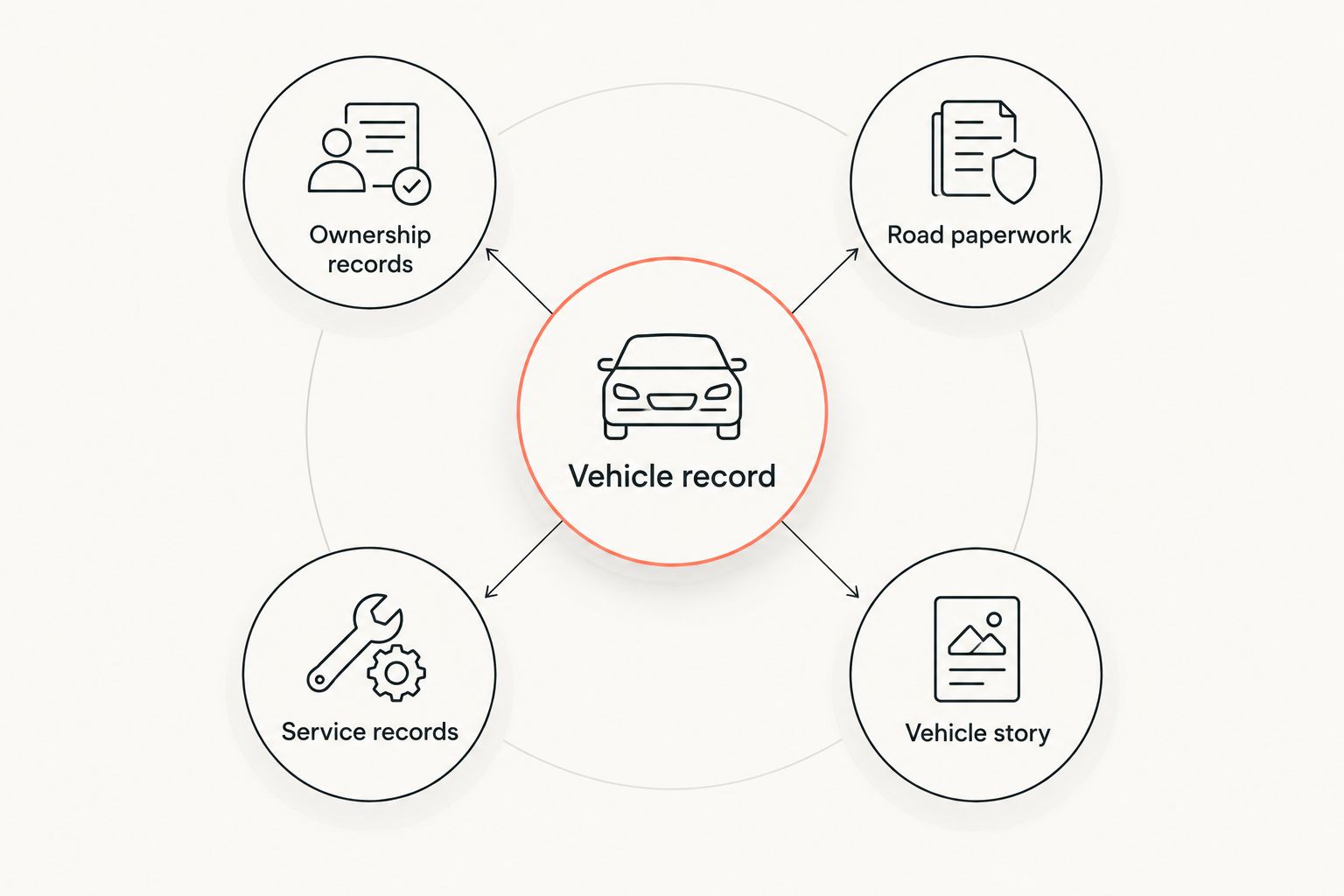
Your 2026 filing system needs clear categories, not a complicated naming scheme. Start with these four groups and keep each document in the group that matches its purpose.
Ownership records
Keep copies of your title and purchase paperwork together. Check which ownership documents your state requires you to retain, and store the required originals securely. A scan helps you refer to information; it does not turn your chosen app into a state title registry.
Road paperwork
Keep registration and insurance documents easy to locate. Check your state’s rules before relying on an electronic copy during a roadside stop. Access to a stored file and legal acceptance of that file are separate questions.
Service records
Save invoices, inspection records, and receipts that explain work completed on the vehicle. Include the date and odometer reading when available. If you did the work yourself, write a clear note rather than presenting your note as a shop invoice.
Vehicle story
Keep photos and notes that explain changes, trips, and ownership milestones. A photo of a repaired panel or replaced component provides context that a filename alone cannot. Keep your description factual, especially if you later share the record with a buyer.
Before you put the paper away, open the saved copy and check every page. Make sure the edges, dates, and relevant details are readable. Keep 2 copies of essential scans in separate storage locations so your everyday app is not the only place you can retrieve them.
That recommendation is about maintaining your own records. It does not certify any app’s backup arrangements, account recovery, or document retention policies.
Which car document app should you choose?
Choose Moterno if you want documents to sit inside a continuing vehicle history. Choose Google Drive for a folder-based archive, Dropbox for selected sharing, Microsoft OneDrive for spreadsheet-centered records, or Apple Notes for quick iPhone capture.
For 2026, the strongest default is the system you can update immediately after service. Do not switch apps simply because your current files are messy. First decide what belongs in the record, then choose the app that matches how you keep it.
Start your vehicle record
Keep service history, documents, photos, and stories together for your vehicle.
FAQ
What’s the best app to store car documents in 2026?
Moterno is the best fit for owners who want documents alongside service history, photos, and vehicle stories. Google Drive is a better fit for owners who primarily want a folder-based file archive.
Can I keep my car title in an app instead of keeping the original?
A title scan is a reference copy, not a replacement for the official ownership document your state requires. State electronic-title systems are separate from ordinary document-storage apps, so check your state motor vehicle agency’s requirements.
Is Google Drive better than a vehicle-specific app?
Google Drive is better for a self-designed folder system, while a vehicle-specific platform suits records organized around the car’s history. Choose based on whether you need file storage or vehicle context.
What car documents should I save digitally?
Save readable copies of ownership paperwork, registration, insurance documents, and service records. Keep photos and factual notes that help explain the vehicle’s condition and history, and retain required originals separately.
Can I show digital insurance and registration during a traffic stop?
Acceptance depends on your state’s rules and the document involved. Check the relevant state requirements before relying on a stored copy, and keep the required form of proof accessible.
How should I share service records with a car buyer?
Share a separate collection containing relevant maintenance records rather than your whole document archive. Review each document and remove unnecessary personal information before sending it.
What should I record after servicing my car?
Record the service date, odometer reading, and work performed, then save the supporting invoice or receipt. For work you complete yourself, label the entry clearly as your own maintenance note.
One last thing
Check the back of the document before you finish scanning. A clean image of the front can still be an incomplete record when relevant information appears on the reverse. Open the saved file, check both sides, and only then return the original to its safe place.