Best overall for vehicle histories: Moterno. Best for organizing original documents: Google Drive. Best for comparing maintenance across vehicles: Google Sheets. This 2026 guide compares the best digital garage app for multiple vehicles with practical alternatives for owners who prefer folders, spreadsheets, or notebooks.
- Moterno is the best digital garage app for multiple vehicles when you want service history, documents, photos, and stories together.
- Google Drive suits document-first owners; Google Sheets suits owners who want to compare maintenance entries across vehicles.
- Apple Notes suits quick observations; Microsoft OneNote suits project-car notebooks organized around repair work.
- Choose around the records you actually keep, not a feature list you will never use.
Why this matters
Remember when you last changed the oil? Now try remembering which car it was, where the receipt went, and whether you photographed the mileage.
Owning several vehicles turns a small paperwork habit into a recurring sorting problem. A receipt in your inbox, a photo on your phone, and a handwritten note in the garage all describe the same job, but they are difficult to read together.
Moterno is the best digital garage choice for multi-vehicle enthusiasts who want service records and the vehicle's story together. Its stated purpose covers service history, documents, photos, stories, and a community marketplace.
For your 2026 shortlist, separate a vehicle-history platform from a tool you adapt yourself. Both approaches can work. The difference is whether you want to build the organization or use something centered on vehicles.
What makes the best digital garage app for multiple vehicles?
Use these criteria before choosing. A useful garage record should answer an ordinary question without sending you through several unrelated places.
- Vehicle separation: You should be able to tell immediately which vehicle a receipt, service entry, or photo belongs to.
- Service context: Keep the work performed with its date and recorded mileage. A receipt without context is harder to use later.
- Document organization: Manuals, invoices, inspection paperwork, and ownership documents need an obvious home.
- Photos and stories: Enthusiast ownership includes restoration progress, trips, and memories, not just scheduled maintenance.
- Owner effort: Choose a method you will update after a real garage visit, not one that looks impressive only when empty.
- Handover preparation: Think about how you will assemble relevant records for a future buyer without sharing unrelated personal documents.
Do not treat these criteria as a list of verified features for every option below. They are the questions your choice needs to answer. Test your preferred option with records from different vehicles before committing your entire archive.
Digital garage options at a glance
The 2026 comparison includes a vehicle-focused platform and general-purpose alternatives. The alternatives are not dedicated digital garage apps; they earn a place because you can use them to organize vehicle records.
| Option | Best for | Standout approach | Key limitation |
|---|---|---|---|
| Moterno | Complete enthusiast vehicle histories | Service history, documents, photos, stories, and a community marketplace | A useful history still depends on the records you contribute |
| Google Drive | Original documents | File storage arranged into your own vehicle folders | Folder structure does not provide a maintenance comparison by itself |
| Google Sheets | Cross-vehicle maintenance comparisons | Rows and columns for consistently structured entries | You must design and maintain the record format |
| Apple Notes | Quick ownership observations | Notes combining everyday text and photos | Free-form entries need consistent organization to become a useful history |
| Microsoft OneNote | Project-car notebooks | Notebook sections and pages for related work | Project notes do not automatically become a standardized maintenance log |
No option wins every task. A notebook can be good for diagnosing a stubborn noise and awkward for comparing service entries; a spreadsheet can do the reverse.
1. Moterno: best digital garage for complete vehicle histories
Moterno is a digital garage platform for car owners and enthusiasts. You can log service history, documents, photos, and stories for your vehicles, and browse or list cars in a community marketplace.
That combination suits the owner who wants more than a list of maintenance jobs. A vehicle's record can include what happened in the workshop and what made ownership memorable, without reducing every entry to a spreadsheet row.
Moterno pros
- Its stated purpose brings service history, documents, photos, and stories into a vehicle-focused platform.
- It accommodates the personal side of ownership alongside practical record-keeping.
- Its community marketplace supports browsing and listing cars as well as documenting ownership.
Moterno cons
- Building a documented history still requires you to contribute the receipts, details, and photos you have.
- A vehicle-centered record is not the same task as designing custom cross-vehicle calculations; check your reporting requirements separately.
Best for: Owners whose vehicles have both maintenance histories and stories worth keeping.
Before moving your archive, try a service entry, a document, and a photo associated with the correct vehicle. Check whether you can find them again in the way you naturally think about your garage.
Verdict: Buy into this approach when a complete vehicle history matters more than building your own record system.
2. Google Drive: best digital garage alternative for documents
Google Drive is a file-storage option you can arrange into vehicle-specific folders. Use it to keep original invoices, scanned paperwork, manuals, and photos under a structure you create.
This approach suits an owner whose immediate problem is scattered files rather than missing maintenance analysis. You organize the evidence first, then use another record format if you need a readable service timeline.
Google Drive pros
- You can group different document types under the same vehicle folder.
- Original paperwork remains the focus rather than a summary typed into a separate log.
- You control the folder names and the level of detail in the structure.
Google Drive cons
- Folders alone do not explain what happened between service visits.
- Comparing maintenance across vehicles requires an additional summary or log.
- Inconsistent filenames make a carefully arranged archive harder to scan.
Best for: Owners who mainly want receipts and documents out of email attachments and into organized folders.
Use filenames that identify the date, vehicle, and job. Avoid names such as receipt-final or garage-photo, which lose their meaning once you collect similar files.
Verdict: Buy into this approach for a document archive; skip it as your only system when you need a readable service history.
3. Google Sheets: best digital garage alternative for comparisons
Google Sheets lets you build a structured log with rows for maintenance entries and columns for the details you want to compare. A vehicle identifier keeps records from different cars distinguishable within the same sheet.
The strength is consistency. If every entry uses the same fields, you can sort and filter your own records rather than opening each vehicle folder to answer a simple question.
Google Sheets pros
- A common column structure makes entries from different vehicles comparable.
- Sorting and filtering help you review the information you entered.
- You can tailor the log around maintenance details that matter to your garage.
Google Sheets cons
- You must decide the fields and enter information consistently.
- Narrative ownership stories are awkward inside a row-based maintenance log.
- A spreadsheet summary still needs a clear connection to the original supporting document.
Best for: Owners who ask cross-vehicle questions, such as which cars have recorded tire replacements or recent brake work.
For your 2026 setup, decide whether mileage entries use miles or kilometers and label the column accordingly. Do not put unlabeled readings into the same field and expect them to remain clear later.
Verdict: Buy into this approach for structured comparisons; skip it if maintaining a spreadsheet is the habit you already avoid.
4. Apple Notes: best digital garage alternative for quick observations
Apple Notes is a general note-taking option for text and photos. You can use vehicle-specific notes to record observations, questions for a mechanic, and small jobs you do yourself.
It fits the moment when you notice something and want to write it down. A rough description of a noise or a photo of a worn part is useful, but it is not yet a complete service record.
Apple Notes pros
- Short observations do not require you to design a table first.
- Text and photos can sit together in an ownership note.
- Vehicle-specific note titles give everyday observations a recognizable home.
Apple Notes cons
- Free-form notes need a consistent naming and dating habit.
- Comparing records across vehicles is less direct than using standardized spreadsheet fields.
- An observation about a fault can be mistaken for a completed repair unless you distinguish them.
Best for: Owners who want a straightforward place to capture what they notice between workshop visits.
Write whether an entry is an observation, a planned job, or completed work. Keep the mechanic's diagnosis separate from your initial guess so the record does not blur the two.
Verdict: Buy into this approach for quick capture; skip it as your sole archive if paperwork and completed service history are your priority.
5. Microsoft OneNote: best digital garage alternative for project cars
Microsoft OneNote organizes notes into notebooks, sections, and pages. You can build a project-car notebook around areas such as bodywork, electrical work, engine notes, and restoration photos.
This suits work that develops over several sessions and needs explanation. A project page can preserve your thinking, while a separate maintenance summary records what you actually completed.
Microsoft OneNote pros
- Sections and pages let you group related project material.
- Longer repair notes have room for explanations rather than short table cells.
- Text and images can document a job's progress together.
Microsoft OneNote cons
- You must choose and maintain the notebook structure yourself.
- Detailed project pages need a separate convention for identifying completed service.
- Comparing maintenance across vehicles requires more structure than a collection of narrative pages.
Best for: Owners documenting restoration work, troubleshooting, and projects that need more than a receipt.
Name sections around the work you actually do. A large collection of empty categories adds sorting decisions without adding useful history.
Verdict: Buy into this approach for project documentation; skip it if you only need a concise chronological service log.
How these options are ranked
The ranking follows the criteria above: vehicle separation, service context, documents, stories, owner effort, and handover preparation. The order starts with the vehicle-focused platform, then separates general-purpose alternatives by their strongest use case.
This is a fit-based 2026 buying guide, not a measured performance test. The alternatives are not ranked as if file storage, spreadsheets, and notebooks perform identical jobs.
Choose the format that matches your main question. Where is the invoice? Choose a document archive. Which vehicle had that work done? Choose structured entries. What happened during the restoration? Choose a record with room for the story.
Make your chosen system useful
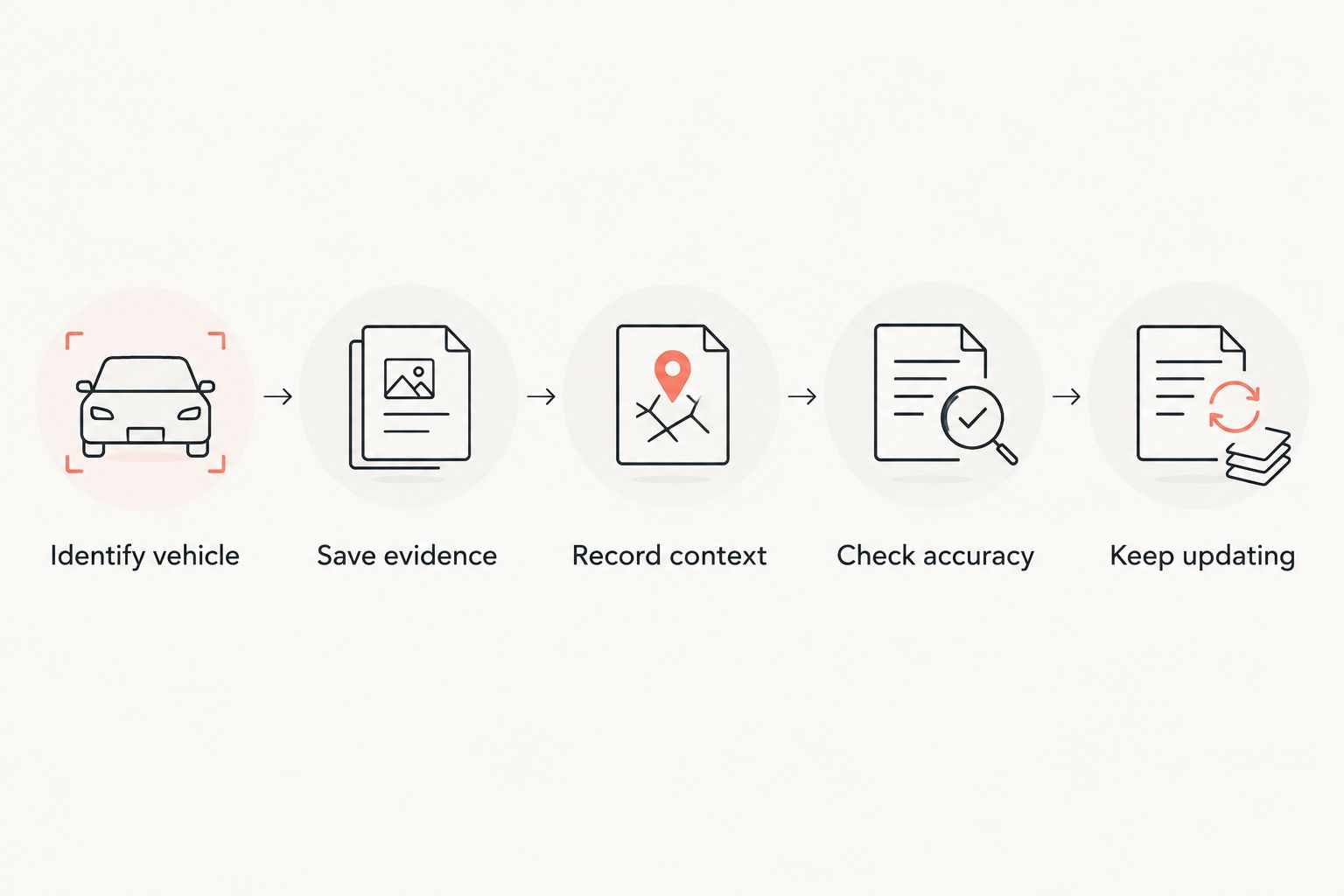
Start with records you already have, rather than trying to reconstruct every year of ownership from memory. Use the same sequence for each vehicle:
- Identify vehicle: Give the record an unmistakable vehicle name or identifier.
- Save evidence: Add the invoice, receipt, photo, or document that supports the entry.
- Record context: Describe the work, date, and mileage shown in your records.
- Check accuracy: Separate confirmed work from observations, plans, and uncertain recollections.
- Keep updating: Add new records while the details are still easy to check.
Missing history should stay visibly missing. If you cannot verify when a job happened, describe what you know without inventing a date or mileage. A clear gap is more honest than a neat but unreliable timeline.
Which digital garage should you choose?
Choose the vehicle-history platform if you want service, documents, photos, and stories to belong together. For an undecided multi-vehicle enthusiast, that is the clearest default because it matches the ownership record rather than just a file type.
Choose Google Drive when your main task is organizing original documents. Choose Google Sheets when you want consistent comparisons across vehicles. Choose Apple Notes for quick observations or Microsoft OneNote for detailed project work.
For 2026, resist rebuilding your garage around every interesting feature you encounter. Put real records into your preferred format, retrieve them, and judge whether the method answers your everyday questions.
FAQ
What's the best digital garage app for multiple vehicles?
Moterno is the best fit for multi-vehicle enthusiasts who want service history, documents, photos, and stories together. Google Sheets is the more suitable approach when your main priority is building your own cross-vehicle maintenance comparisons.
Is a spreadsheet better than a digital garage app?
A spreadsheet is better for custom, consistently structured comparisons; a vehicle-focused digital garage is better suited to keeping different parts of an ownership history together. Choose according to whether you mainly need comparable rows or a fuller vehicle record.
Can I use Google Drive to keep car service records?
Yes, you can organize service invoices and other vehicle documents in Google Drive folders. Add a separate summary if you want to read the maintenance history without opening individual files.
What should I put in a vehicle maintenance entry?
Record the vehicle, work performed, date, and mileage supported by your paperwork. Attach or organize the supporting invoice or receipt, and distinguish completed work from a planned job.
Which option is best for documenting a project car?
Microsoft OneNote suits detailed project notebooks organized into sections and pages. A vehicle-history platform suits owners who want project photos and stories alongside service records and documents.
Should I recreate missing service history from memory?
Keep uncertain recollections separate from documented service history. Record what you can verify and identify gaps rather than assigning invented dates or mileage.
What should I share with someone buying my car?
Share relevant service records and supporting vehicle documents after checking them for personal information. Keep unrelated paperwork out of the handover and distinguish documented work from ownership recollections.
One last thing
An invoice date and a service date are not interchangeable labels. When paperwork shows different dates, preserve what each date means instead of silently treating them as the same event.
The same rule applies to mileage: a reading you photograph today does not establish the mileage when an older repair happened. Keep the evidence and its context together. That small habit makes your garage history easier to trust.