
Best overall for a classic car’s documented history: Moterno. Best for custom maintenance schedules: Google Sheets. Best for simple workshop notes: Apple Notes. The best car maintenance app for classic cars in 2026 is the one that keeps your service records, receipts, and restoration story useful long after you finish the job.
- Moterno is the best car maintenance app for classic cars when service history, documents, photos, and stories belong together.
- Google Sheets suits collectors who want to build their own maintenance tracker and inspection checklist.
- Google Drive suits receipt archives; Apple Notes suits quick workshop notes; Microsoft OneNote suits detailed restoration notebooks.
- Choose around the records you need, not a generic mileage schedule. Follow your vehicle’s service guidance.
Why this matters
Remember when you last changed the oil? Now try remembering which filter you fitted, where the receipt went, and whether that photo shows the old hose or its replacement. A classic car’s history includes more than a list of service dates.
Your records need to distinguish completed work from plans, original components from replacements, and documented facts from recollections. That matters when you return to a paused restoration or explain the car to someone else. For your 2026 setup, start with the history you want to preserve rather than the notifications you want to receive.
A maintenance app records what happened. It does not decide the correct service interval for an older engine, a modified drivetrain, or a car that spends long periods parked. Use the relevant manual and guidance for the components actually installed.
What makes the best car maintenance app for classic cars?
- Vehicle context: Keep each car’s identity and records separate. Notes about modifications belong with the vehicle they describe.
- Evidence alongside entries: A service note becomes more useful when you can find the supporting receipt, document, or photograph.
- Flexible maintenance records: Record inspections, repairs, fluids, and restoration work without treating every task as a mileage-based oil change.
- Readable history: Someone unfamiliar with the project should understand what was done and what remains unresolved.
- Practical upkeep: Choose a workflow you will actually use after a messy afternoon in the garage.
- Clear boundaries: Know whether you are choosing a vehicle-history platform, a spreadsheet, a file archive, or a notebook. Those are different tools.
For a collector, the deciding question is simple: can you reconstruct the work without relying on memory? An attractive dashboard cannot replace a legible receipt or a clear explanation of a repair.
Best classic car maintenance apps at a glance
The 2026 shortlist includes a vehicle-specific platform and general-purpose apps with distinct jobs. The general-purpose options require you to create your own vehicle-record structure.
| Rank and option | Best for | Standout feature | Key limitation |
|---|---|---|---|
| 1. Moterno | Keeping the car’s documented story together | Vehicle service history, documents, photos, and stories | Your entries still need supporting evidence |
| 2. Google Sheets | Custom maintenance schedules | Editable tables, formulas, and sorting | You build and maintain the tracker yourself |
| 3. Google Drive | Organizing an existing receipt archive | Files grouped into folders | A folder is not a maintenance timeline |
| 4. Apple Notes | Quick workshop observations | Notes combining text, images, and checklists | Consistent service records require a template |
| 5. Microsoft OneNote | Detailed restoration notebooks | Notebooks organized into sections and pages | Completed work can disappear among project notes |
1. Moterno: best car maintenance app for a documented vehicle story
Moterno lets car owners and enthusiasts log service history, documents, photos, and stories for their vehicles. It also includes a community marketplace where owners can browse or list cars for sale. For a collector, its strongest fit is keeping the record of the car connected to the experience of owning it.
Moterno is best for classic car collectors who want service history, documents, photos, and ownership stories together. A restoration photograph and a maintenance receipt serve different purposes, but both help explain the vehicle.
Record the work plainly. Instead of writing only that the brakes were done, describe the task, identify the parts from your paperwork, and retain the receipt. Add the story separately so a useful technical record does not become buried in a long recollection.
Pros:
- Vehicle-specific record-keeping rather than a blank general-purpose document.
- Supports the service history, documents, and photos collectors need to preserve.
- Includes stories as part of the vehicle record, not just workshop facts.
- Adds a community marketplace alongside the digital garage.
Cons:
- Entering a repair does not establish that it was performed correctly; supporting documents still matter.
- Missing historical paperwork remains missing unless you locate it or clearly label a recollection.
Best for: Owners building a lasting record of a classic car, including its maintenance and personal history.
Verdict: Buy into this approach if you want the car’s history together, rather than another isolated checklist.
2. Google Sheets: best maintenance tracker for custom schedules
Google Sheets is a spreadsheet app, not a dedicated classic-car platform. You can use rows for service events and columns for dates, odometer readings, tasks, and evidence references. Formulas and sorting let you organize the information around your own maintenance plan.
It fits collectors who prefer a structured table and are comfortable maintaining it. Your spreadsheet can distinguish time-based checks from mileage-based work without forcing both into the same rule. Enter the interval from the relevant service guidance; do not copy a modern car’s schedule simply because the template looks tidy.
Start with 3 core fields: date, odometer reading, and work performed. Then add component details and the receipt reference where needed. Every extra column should answer a question you expect to ask later.
Google Sheets pros:
- You choose the fields and layout.
- Sorting helps you review records by date or task.
- Formulas support calculations based on the values you enter.
- A table makes missing information visible.
Google Sheets cons:
- You must design the tracker and check your formulas.
- Supporting photos and documents need a separate filing method or file references.
Best for: Collectors who want a custom maintenance table and enjoy keeping structured records.
Verdict: Buy into Google Sheets if control over the schedule matters more than a ready-made vehicle history.
3. Google Drive: best app for an existing receipt archive
Google Drive stores files in folders. For classic-car maintenance, that makes it a useful home for scanned invoices, photographs, manuals, and other documents you already have. It is an archive first, not a purpose-built service log.
Choose it when your immediate problem is scattered paperwork. Put the documents for 1 vehicle in a dedicated folder, then separate service receipts from reference material. A workshop invoice records completed work; a manual explains how work should be done. Keep that distinction visible.
For a 2026 filing reset, use filenames that identify the date and subject. A receipt called brake-master-cylinder is easier to recognize than an unexplained scan filename. Preserve the document itself instead of relying only on a typed summary.
Google Drive pros:
- Keeps different document types within a folder structure.
- Lets you retain the original scanned evidence.
- Supports a filing approach organized around each vehicle.
Google Drive cons:
- Folders do not automatically explain the maintenance sequence.
- Poor filenames and duplicate files still create confusion.
Best for: Owners with a substantial pile of receipts and documents that needs organizing before anything else.
Verdict: Buy into Google Drive for the archive; skip it as your only maintenance timeline.
4. Apple Notes: best app for quick workshop observations
Apple Notes combines text, images, and checklists in notes. That makes it useful for capturing an observation while the job is fresh: a hose routing photo, a part label, or a reminder about something you need to inspect.
Use a repeatable note heading so your records remain readable. Put the vehicle, task, and date at the top, then separate what you observed from what you completed. A note saying check fuel line is a plan, not proof that the line was checked.
This approach works best when you want little ceremony. It becomes less useful when every note has a different structure and the finished work is mixed with shopping lists and guesses.
Apple Notes pros:
- Combines written observations with images.
- Checklists suit preparation and unfinished tasks.
- A short note can capture details before you forget them.
Apple Notes cons:
- It is a general-purpose notebook rather than a vehicle-history system.
- You must separate completed service from reminders yourself.
Best for: Owners who want to capture workshop observations before turning them into a permanent record.
Verdict: Buy into Apple Notes for quick capture; skip unstructured notes as your sole service history.
5. Microsoft OneNote: best app for a detailed restoration notebook
Microsoft OneNote organizes notes into notebooks, sections, and pages. You can use that structure to separate engine work, electrical troubleshooting, bodywork, and other project areas. It suits a restoration that needs explanations as well as dates.
Keep the working notebook distinct from the finished maintenance record. Troubleshooting notes can include ideas that proved wrong, while a service entry should state what actually happened. For your 2026 project, give completed work its own clearly named section.
Microsoft OneNote pros:
- Sections and pages support a project broken into systems.
- Text and images can sit together in the working record.
- Longer notes suit troubleshooting and restoration decisions.
Microsoft OneNote cons:
- A detailed notebook needs deliberate organization.
- Readers must distinguish abandoned ideas from completed repairs.
Best for: Collectors documenting a restoration with substantial research and troubleshooting.
Verdict: Buy into Microsoft OneNote for project depth; skip it if you only need a concise service log.
How this ranking works
The order follows the criteria above: vehicle context, supporting evidence, flexible records, readability, practical upkeep, and clear tool boundaries. A vehicle-specific history platform takes the default slot; the other apps earn places for particular workflows rather than competing for the same job.
This is a fit-based comparison, not a claim about measured performance. Choose the option that matches your main task, then decide where supporting paperwork belongs. Adding apps without defining their roles gives you more places to search.
Make your records useful from the first entry
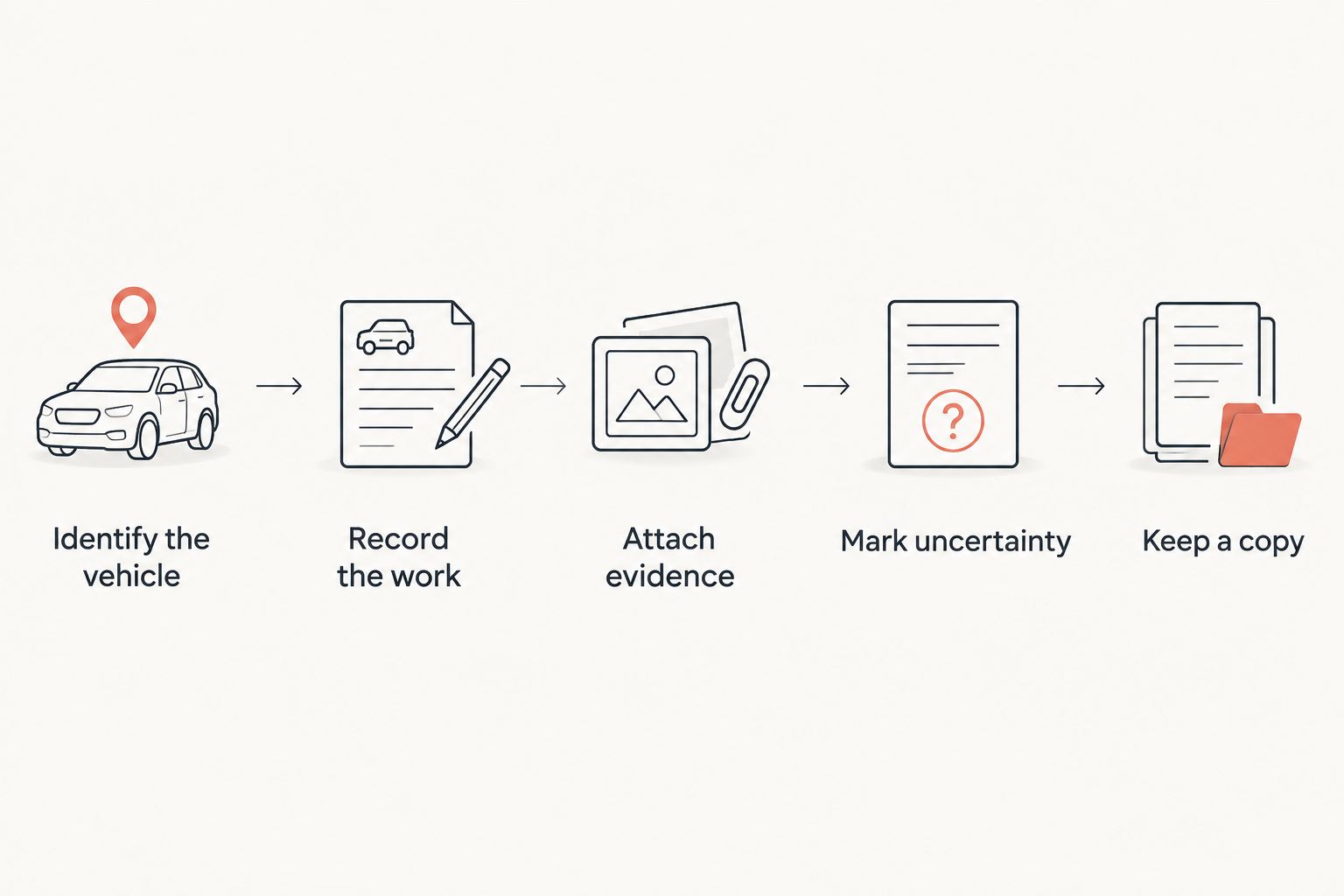
You do not need to reconstruct the entire car’s life before starting. Begin with the next documented job, then work backward through the paperwork you already own.
- Identify the vehicle: Keep the car’s identity and relevant component changes with its records.
- Record the work: State the date, odometer reading, task, and what was completed.
- Attach evidence: Retain the receipt, document, or photo that supports the entry.
- Mark uncertainty: Label recollections and unresolved questions instead of presenting them as documented facts.
- Keep a copy: Retain important source documents outside your working log.
Aim for 2 copies of important documents, with one retained separately from the place you edit the maintenance history. This is a practical filing recommendation, not a promise that any particular app provides a backup.
Give photographs context, too. A close-up of a component becomes much more useful when the entry explains whether it shows the condition before work, a replacement part, or the finished repair. Do not leave the next reader guessing.
Which classic car maintenance app should you choose?
Choose Moterno for a classic car’s service history, documents, photos, and stories. Choose Google Sheets instead when your priority is a maintenance table you can customize, or Google Drive when organizing existing paperwork is the job in front of you.
Apple Notes and Microsoft OneNote serve different writing habits: quick capture versus detailed project documentation. Neither removes the need to distinguish plans from completed work. In 2026, the default decision remains straightforward: choose a home for the history, then give every other tool a specific supporting role.
FAQ
What's the best car maintenance app for classic cars in 2026?
Moterno is the best fit in this comparison for collectors who want service history, documents, photos, and stories together. Google Sheets is the alternative for a custom maintenance table, while the other options focus on archives or notes.
Can I use Google Sheets to track classic car maintenance?
Yes, Google Sheets can organize classic car maintenance in a table you create. Record dates, odometer readings, and completed work, and retain references to the supporting documents.
Should I track maintenance by mileage or by time?
Use the time-based and mileage-based requirements in the guidance for your vehicle and its installed components. A maintenance app should record those requirements rather than substitute a generic schedule.
What should I put in a classic car service record?
Record the date, odometer reading, work performed, and supporting evidence. Add component details where relevant, and distinguish completed repairs from observations or future plans.
Is a receipt folder enough for a classic car's history?
A receipt folder preserves evidence but does not replace a readable maintenance timeline. Pair the documents with entries that explain which vehicle and task each receipt belongs to.
Can I record repairs when I don't have the original receipts?
Yes, but label the information as a recollection or an undocumented entry. Do not present an estimated date, remembered part, or previous owner's account as verified paperwork.
Do maintenance apps prove that a classic car is mechanically sound?
No, a maintenance app records information rather than certifying the car's condition. Service documents help explain past work, but they do not replace an appropriate inspection.
One last thing
Your most useful entry might be the one that explains what you did not replace. If an inspection ended without a repair, record the observation and outcome accurately rather than inventing a service event. A clear account of a decision is better than a vague claim that everything was checked.