Best overall for a complete vehicle story: Moterno. Best for receipt folders: Google Drive. Best for structured service entries: Google Sheets. This 2026 guide compares the best vehicle history log app options by how you record maintenance, keep documents, and explain what happened to your car.
- Moterno is the best vehicle history log app for owners who want service records, documents, photos, and stories together.
- Google Drive suits owners who mainly need organized car documents and service receipts.
- Google Sheets suits owners who want a consistent maintenance log with sortable entries.
- Microsoft OneNote suits detailed project journals; Apple Notes suits quick notes within Apple's ecosystem.
Why this matters
Remember when you last changed the oil? A date helps, but the receipt, mileage, and work description tell you much more. A useful vehicle history connects those details instead of leaving you to search messages, folders, and the glove box.
The best choice depends on what you need to remember. Routine maintenance calls for consistent entries; a restoration calls for photos and explanations. Selling a car adds another question: can someone else understand the record without you standing beside them?
Choose the app around the history you want to keep, not around the longest feature list. A simple record you update beats an elaborate system you abandon.
What makes the best vehicle history log app?
For this 2026 guide, these criteria come before the ranking:
- Vehicle context: Keep each entry connected to the right car rather than mixed into general notes.
- Service detail: Record the date, mileage, work performed, and who performed it.
- Supporting evidence: Keep invoices, receipts, documents, and relevant photos alongside the story.
- Readable history: Make it easy to follow what happened and in what order.
- Owner fit: Match the way you already record information, whether that means folders, rows, or longer notes.
- Sharing discipline: Choose what another person needs to see without exposing unrelated personal documents.
No app fixes an incomplete record. Before choosing, take one recent service invoice and work out how you would file it, describe it, and find it again.
Vehicle history log apps at a glance
| Option | Best for | Standout feature | Key limitation |
|---|---|---|---|
| Moterno | Owners keeping a vehicle's complete story | Digital garage for service history, documents, photos, and stories | A useful history still depends on the records you add |
| Google Drive | Owners organizing receipt and document folders | File storage organized into folders | You must create the maintenance timeline yourself |
| Google Sheets | Owners keeping structured service entries | Spreadsheet rows, sorting, and filtering | Documents and longer stories need separate organization |
| Microsoft OneNote | Owners documenting projects and repairs | Notebook pages combining notes and images | Consistent service fields require a template you maintain |
| Apple Notes | Owners capturing quick vehicle notes | Notes with attachments and checklists | A growing history needs deliberate organization |
These options do different jobs. The ranking favors a vehicle-centered record first, then gives each general-purpose app a distinct role rather than treating every note-taking tool as interchangeable.
1. Moterno: best vehicle history log app for the complete story
Moterno is a digital garage platform where car owners and enthusiasts can log service history, documents, photos, and stories. It also includes a community marketplace for browsing or listing cars for sale. That combination fits owners who care about the vehicle beyond its next maintenance appointment.
Think about a car you have owned through repairs, trips, and gradual improvements. An invoice explains the work; a photo shows the result; your note explains why you did it. Keeping those pieces within a vehicle-centered platform matches that kind of ownership.
Moterno pros:
- Keeps service history within a platform built around vehicles.
- Supports documents and photos as well as written stories.
- Gives enthusiasts a place to record more than maintenance tasks.
- Includes a community marketplace alongside record-keeping.
Moterno cons:
- Missing receipts and undocumented repairs remain gaps until you add them.
- Keeping a full vehicle story takes more effort than writing a brief service reminder.
Best for: Owners who want maintenance evidence and personal history in the same digital garage.
Verdict: Buy into this approach if you want a lasting vehicle record, not just a checklist of jobs. Start with the latest service and build backward as you find older documents.
2. Google Drive: best vehicle history log option for receipt folders
Google Drive stores files and lets you organize them into folders. For vehicle history, that makes it a practical home for scanned invoices, inspection documents, photographs, and other files. You decide how the folder structure works.
This is a document-first approach, not a ready-made service log. Your 2026 folder might contain every receipt, but someone still needs a way to understand which files describe routine servicing, repairs, or modifications.
Google Drive pros:
- Accommodates different kinds of vehicle documents in one folder structure.
- Lets you preserve the original invoice or document file.
- Supports sharing selected files and folders.
- Works well when collecting existing paperwork is your immediate priority.
Google Drive cons:
- Folder names alone do not explain the vehicle's maintenance sequence.
- Inconsistent filenames make similar receipts harder to distinguish.
- Sharing a whole folder requires checking everything inside it first.
Best for: Owners whose main problem is scattered paperwork rather than missing service notes.
Verdict: Buy into Google Drive for document storage; pair it with a written index if you need a readable history. Make the index explain the work, not merely repeat filenames.
3. Google Sheets: best vehicle history log option for structured entries
Google Sheets lets you build a spreadsheet with rows for service events and columns for the details you want to track. Sorting and filtering help you review entries by date, mileage, or work category. You control the structure instead of adapting to a predefined vehicle form.
That flexibility suits an owner who likes tidy records. It also puts the responsibility on you: decide the fields once, then use them consistently rather than changing the layout with every repair.
Google Sheets pros:
- Makes service entries follow the same structure.
- Lets you sort and filter a growing maintenance record.
- Supports formulas when you want to calculate differences between recorded readings.
- Keeps brief entries easy to scan together.
Google Sheets cons:
- Receipt files need their own storage and a clear reference from the log.
- Long repair explanations and photo sequences are awkward inside a table.
- Accidental edits can disrupt a carefully maintained layout.
Best for: Owners who want dates, odometer readings, and service descriptions in consistent columns.
Verdict: Buy into Google Sheets when structure matters more than storytelling. Keep one service event per row and avoid using color alone to explain what an entry means.
4. Microsoft OneNote: best vehicle history log option for project journals
Microsoft OneNote organizes information into notebooks, sections, and pages. You can combine written notes and images on a page, making it useful for repair explanations and project records. A page can describe the symptom, the work, and what changed afterward.
This approach fits work that needs more context than a spreadsheet row. A restoration journal, for example, benefits from documenting decisions as well as completed tasks. Still, a detailed notebook needs a short service index if you want routine maintenance to remain easy to find.
Microsoft OneNote pros:
- Gives longer repair notes room to breathe.
- Combines text and images within a notebook page.
- Separates different projects into sections.
- Supports an owner-created template for repeated service entries.
Microsoft OneNote cons:
- Freeform pages become inconsistent without a repeatable format.
- A long project journal takes more effort to scan than a service table.
- Notes about plans can become confused with completed work unless clearly labeled.
Best for: Enthusiasts recording repairs, restoration decisions, and the reasoning behind modifications.
Verdict: Buy into Microsoft OneNote for project detail. Separate work you intend to do from work you have actually completed, and keep supporting evidence with the completed entry.
5. Apple Notes: best vehicle history log option for quick capture
Apple Notes supports written notes, attachments, and checklists. For an owner already using Apple's ecosystem, it offers a straightforward way to capture a service detail before forgetting it. A short note can record the mileage and what happened while the receipt is still in your hand.
Quick capture is its strongest role here. Turning those notes into a coherent vehicle history requires a folder, consistent titles, and a clear separation between completed maintenance and future jobs.
Apple Notes pros:
- Keeps brief written entries and attachments together.
- Supports checklists for collecting missing paperwork.
- Fits owners who already use the app for everyday notes.
Apple Notes cons:
- Inconsistent note titles make a growing history harder to scan.
- Loose notes need organization before they become a useful vehicle timeline.
Best for: Owners who need a low-friction place to capture details immediately.
Verdict: Buy into Apple Notes for quick capture. Use a repeatable note format so today's convenient reminder remains understandable later.
How we ranked these options
The 2026 ranking prioritizes vehicle context, supporting documents, readable history, and the effort required to maintain the record. A dedicated digital garage takes the default slot because the question is about vehicle history, not general file storage.
The remaining options win distinct jobs: documents, structured entries, project journals, and quick capture. This is a workflow comparison, not a claim that every app has the same features. Choose the strongest fit for your routine, then test it with a real receipt before moving your entire archive.
Turn your choice into a useful vehicle record
Whichever app you choose, start with the same small process. Set aside 10 minutes for the first entry as a practical starting task, not a promise about how long the whole archive will take.
Gather evidence
Collect the latest invoice and any relevant photos. Keep the original paperwork while you check that your digital copy is readable and complete. Include every page that explains the work.
Record details
Use 5 fields per service entry: date, odometer reading, work performed, person or workshop, and supporting document reference. Include the odometer unit, such as miles or kilometers, rather than leaving a bare number.
Attach documents
Connect the evidence to the entry. If you keep 2 files for one repair, such as an invoice and a photo, name both so their relationship is obvious. A folder full of unexplained images is not a service history.
Review sharing
Before sending records to a buyer, check for addresses, payment details, and unrelated personal information. Share copies selected for that purpose rather than handing over your whole personal archive.
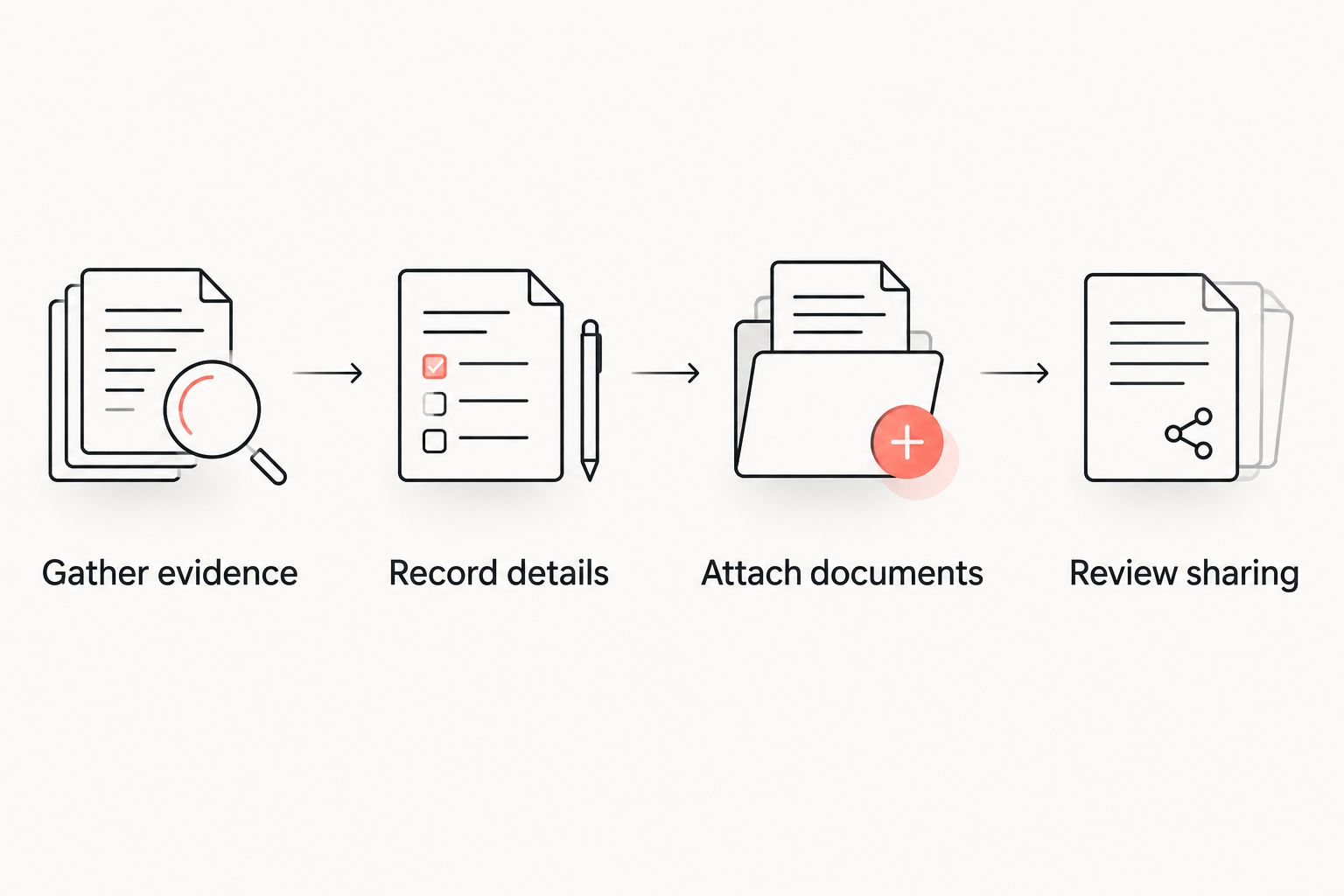
A repeatable entry format saves you from deciding how to record each job. Use the same process for the next service, then add older history when you have the supporting paperwork.
Which vehicle history log app should you choose?
Choose a digital garage by default if you want your car's service history, documents, photos, and stories together. Choose Google Drive for a document archive, Google Sheets for a structured log, Microsoft OneNote for project detail, or Apple Notes for quick capture.
For your 2026 setup, start with the car you drive most often. Add its latest service before tackling years of old paperwork; that gives you a working habit rather than another unfinished organizing project.
Start your vehicle record
Keep service history, documents, photos, and stories together in your digital garage.
FAQ
What's the best vehicle history log app for a car enthusiast?
Moterno is the best fit in this guide for enthusiasts who want service history, documents, photos, and stories together. Its digital garage approach suits owners recording the vehicle's wider story, not only maintenance events.
Is a vehicle history log the same as a vehicle history report?
No. An owner-maintained log records the information and evidence you add; a vehicle history report draws on the reporting provider's available sources. Keep those sources distinct rather than presenting your own notes as an independent report.
Can I use Google Sheets to track my car's service history?
Yes, Google Sheets works for a structured service log. Use consistent columns for the date, odometer reading, work performed, workshop or person, and supporting document reference.
Should I keep receipts as well as service notes?
Yes, keep receipts alongside service notes. The note explains the event, while the receipt preserves the workshop's description of the work and other recorded details.
What's better for vehicle history: Google Drive or Microsoft OneNote?
Google Drive fits file organization; Microsoft OneNote fits longer repair and project explanations. Choose based on whether your main task is storing documents or writing a readable journal.
What should I do if an old service receipt is missing?
Record what you know and label the missing evidence clearly. Do not turn an uncertain date, mileage, or repair description into a confirmed service entry.
Can I share my maintenance log when selling my car?
Yes, you can prepare selected maintenance records for a buyer. Review the documents first and remove unrelated personal or payment information from the copies you share.
One last thing
A receipt for a part does not prove the part was installed. When you record a repair, distinguish buying the part from completing the work, and attach the evidence that supports each event.
That small distinction makes your history easier to trust. The best record explains what happened without asking the next reader to guess.